
ajax
Messin’ with the Couch – Part 1
Awesome. We’ve got a bit of data crumbs on our Couch, now let’s see if you can interact with our Couch from a basic webpage. That’s the ultimate goal, right? But which tools will we use? The web is swarming with frameworks, modules, plugins, and templates to help a developer create a web work-of-art. This can be mildly overwhelming for the newbie web/mobile developer, so let’s try and narrow down the plethora of tools out there that we can use to build out the pieces we may need.
The tool bag
No, not the guy that went to your high school who tried way too hard to be cool. This is the pack of tools that will help us lay down our back-end, midtier, and UI. To get us started (and mind you, this is always subject to change), let’s jot down the technologies we may want to incorporate to help us meet the goal of this app, and what we’re going to use them for.
- CouchDB – our database, duh!
- node.js – Our poison of choice to talk to our database. With it comes a bunch of modules that can be installed separately to help make our lives a little easier.
- AngularJS – Google’s behemoth of a framework that will force us into the MVC architectural pattern. We’ll start out MVW (model-view-whatever) and try and make our way to MVC.
- Bootstrap – a gem of a front-end framework that is comprised of a bunch of HTML and CSS goodies. It’ll help us make a sweet-looking site that’ll be just as responsive we when migrate over to a mobile application.
Take a REST
We have our database sitting pretty on our Couch, now let’s REST on it. Let’s start simple and use basic AJAX calls via jQuery to do stuff with it. We’ll be using this straightforward Couchdb tutorial as a flotation device to start development until we’re comfortable enough to swim the waters alone. We’ll add a little flair with Bootstrap to make ourselves feel better.
First, lets look at our database. It’s been oversimplified to make things less intense in the beginning. We’ve added three sample documents as test data in our Pterobase

Each document has an _id and _rev (CouchDB-assigned), a playername, and a scorevalue

Now, over to our text editor. To get started, we’ll cram everything into a single index.html file. Cringe-worthy, yes. But, we need to start somewhere. Running in Visual Studio (for the PC folks) will make things a bit easier when it comes to running things on a web server.
The body
This file contains hidden or bidirectional Unicode text that may be interpreted or compiled differently than what appears below. To review, open the file in an editor that reveals hidden Unicode characters.
Learn more about bidirectional Unicode characters
| <body onload="createView(); getScores();"> | |
| <div class="alert alert-success" style="display: none">Relax. We got ya connected, bro.</div> | |
| <div class="alert alert-danger" style="display: none">Aw snap, son. Didn't connect.</div> | |
| <h1>Pterrible Scores</h1> | |
| <input type="button" id="add" value="Add" onclick="addScore();" /> | |
| <div id="scores"></div> | |
| </body> |
Ah, the body of a webpage. And a Bootstrapin’ body at that! Our onload functions are going to create a view on our CouchDB (more on that later) and will get our scores from the database. We’ll throw in some spicy alerts a-la Bootstrap to let us know if our connection to our pterobase failed, an add button too add a new player name and score (for giggles), and a table to display our data
The view (not the television show)
This file contains hidden or bidirectional Unicode text that may be interpreted or compiled differently than what appears below. To review, open the file in an editor that reveals hidden Unicode characters.
Learn more about bidirectional Unicode characters
| function createView() { | |
| var view = { | |
| "language": "javascript", | |
| "views": { | |
| "playername_w_score": { | |
| "map": "function(doc) {if (doc.scorevalue) {emit(doc.scorevalue, doc);}}" | |
| } | |
| } | |
| } | |
| $.ajax({ | |
| type: "PUT", | |
| url: DATABASE + "/_design/scores", | |
| contentType: "application/json", | |
| data: JSON.stringify(view) | |
| }); | |
| } |
This nugget will create a view within our pterobase. CouchDB uses these views to spit out the information we want to see, given what we want to do. In this case, we want a view of an entire document, but only if that document has a scorevalue and a playername field. We also want the score as the key and the value to be the entire document (hence the “emit(doc.scorevalue, doc);”). Why? No particular reasoning, it’ll just be easier for us to work with. We could certainly make doc._id our actual key, but nah. We can test this out in Futon’s temporary view tool

Every document in our pterobase has these two fields at the moment, so when we run our function, all of our documents are returned. Success!
The services
This file contains hidden or bidirectional Unicode text that may be interpreted or compiled differently than what appears below. To review, open the file in an editor that reveals hidden Unicode characters.
Learn more about bidirectional Unicode characters
| function getScores() { | |
| $.ajax({ | |
| url: DATABASE + "/_design/scores/_view/playername_w_score", | |
| success: function (data) { | |
| var view = JSON.parse(data); | |
| var scores = []; | |
| $(".alert-success").show(); | |
| $(view.rows).each(function (index, item) { | |
| scores.push(item.value); | |
| }); | |
| displayScores(scores); | |
| }, | |
| error: function () { $(".alert-danger").show(); } | |
| }); | |
| } | |
| function displayScores(scores) { | |
| var html = "<table class=\"table .table-hover>\""; | |
| $(scores).each(function (index, score) { | |
| var edit = "<input type='button' value='Edit Name' " + | |
| "onclick='editPlayerName(" + JSON.stringify(score) + ")' />"; | |
| var del = "<input type='button' value='Delete' " + | |
| "onclick='deleteScore(" + JSON.stringify(score) + ")' />"; | |
| html += "<tr>"; | |
| html += "<td>" + score.scorevalue + "</td>"; | |
| html += "<td>" + score.playername + "</td>" | |
| html += "<td>" + edit + "</td>"; | |
| html += "<td>" + del + "</td>"; | |
| html += "</tr>"; | |
| }); | |
| html += "</table>"; | |
| $('#scores').empty(); | |
| $('#scores').append(html); | |
| } | |
| function addScore() { | |
| var scorevalue = prompt("Enter a score"); | |
| var playername = prompt("Enter a name"); | |
| if (scorevalue && playername) { | |
| var score = { | |
| "scorevalue": scorevalue, | |
| "playername" : playername | |
| }; | |
| $.ajax({ | |
| type: "POST", | |
| url: DATABASE, | |
| contentType: "application/json", | |
| data: JSON.stringify(score), | |
| success: function () { | |
| getScores(); | |
| } | |
| }); | |
| } | |
| } | |
| function editPlayerName(score) { | |
| var newplayername = prompt("New name", score.playername); | |
| if (newplayername) { | |
| score.playername = newplayername; | |
| $.ajax({ | |
| type: "PUT", | |
| url: DATABASE + "/" + score._id, | |
| contentType: "application/json", | |
| data: JSON.stringify(score), | |
| success: function () { | |
| getScores(); | |
| } | |
| }); | |
| } | |
| } | |
| function deleteScore(score) { | |
| var doit = confirm("Do you really want to delete this score '" + | |
| score.scorevalue + "'?"); | |
| if (doit) { | |
| $.ajax({ | |
| type: "DELETE", | |
| url: DATABASE + "/" + score._id + "?rev=" + score._rev, | |
| success: function () { | |
| getScores(); | |
| } | |
| }); | |
| } | |
| } |
The fun part! Time to interact with our data. First we’ll specify and attempt to connect to our database. The object returned will be exactly what we saw in our temporary view. We’ll be getting back score objects and storing them to an array for easy finangling in our displayScores function. Our addScore() and editPlayerName() functions are a formality, we’re not going to allow this type of misconduct in our schools! I mean our application. Our deleteScore() function is something we might want to consider keeping.
Combine all the things!
What’s this look like smashed together in our single index.html?
This file contains hidden or bidirectional Unicode text that may be interpreted or compiled differently than what appears below. To review, open the file in an editor that reveals hidden Unicode characters.
Learn more about bidirectional Unicode characters
| <!DOCTYPE html> | |
| <html> | |
| <head> | |
| <title>Scores</title> | |
| <link rel="stylesheet" href="//netdna.bootstrapcdn.com/bootstrap/3.1.1/css/bootstrap.min.css"> | |
| <link rel="stylesheet" href="//netdna.bootstrapcdn.com/bootstrap/3.1.1/css/bootstrap-theme.min.css"> | |
| <script src="//netdna.bootstrapcdn.com/bootstrap/3.1.1/js/bootstrap.min.js"></script> | |
| <script src="https://ajax.googleapis.com/ajax/libs/jquery/1.6.2/jquery.min.js"></script> | |
| <script type="text/javascript"> | |
| var DATABASE = "http://localhost:5984/pteroscores"; | |
| function getScores() { | |
| $.ajax({ | |
| url: DATABASE + "/_design/scores/_view/playername_w_score", | |
| success: function (data) { | |
| var view = JSON.parse(data); | |
| var scores = []; | |
| $(".alert-success").show(); | |
| $(view.rows).each(function (index, item) { | |
| scores.push(item.value); | |
| }); | |
| displayScores(scores); | |
| }, | |
| error: function () { $(".alert-danger").show(); } | |
| }); | |
| } | |
| function displayScores(scores) { | |
| var html = "<table class=\"table .table-hover>\""; | |
| $(scores).each(function (index, score) { | |
| var edit = "<input type='button' value='Edit Name' " + | |
| "onclick='editPlayerName(" + JSON.stringify(score) + ")' />"; | |
| var del = "<input type='button' value='Delete' " + | |
| "onclick='deleteScore(" + JSON.stringify(score) + ")' />"; | |
| html += "<tr>"; | |
| html += "<td>" + score.scorevalue + "</td>"; | |
| html += "<td>" + score.playername + "</td>" | |
| html += "<td>" + edit + "</td>"; | |
| html += "<td>" + del + "</td>"; | |
| html += "</tr>"; | |
| }); | |
| html += "</table>"; | |
| $('#scores').empty(); | |
| $('#scores').append(html); | |
| } | |
| function addScore() { | |
| var scorevalue = prompt("Enter a score"); | |
| var playername = prompt("Enter a name"); | |
| if (scorevalue && playername) { | |
| var score = { | |
| "scorevalue": scorevalue, | |
| "playername" : playername | |
| }; | |
| $.ajax({ | |
| type: "POST", | |
| url: DATABASE, | |
| contentType: "application/json", | |
| data: JSON.stringify(score), | |
| success: function () { | |
| getScores(); | |
| } | |
| }); | |
| } | |
| } | |
| function editPlayerName(score) { | |
| var newplayername = prompt("New name", score.playername); | |
| if (newplayername) { | |
| score.playername = newplayername; | |
| $.ajax({ | |
| type: "PUT", | |
| url: DATABASE + "/" + score._id, | |
| contentType: "application/json", | |
| data: JSON.stringify(score), | |
| success: function () { | |
| getScores(); | |
| } | |
| }); | |
| } | |
| } | |
| function deleteScore(score) { | |
| var doit = confirm("Do you really want to delete this score '" + | |
| score.scorevalue + "'?"); | |
| if (doit) { | |
| $.ajax({ | |
| type: "DELETE", | |
| url: DATABASE + "/" + score._id + "?rev=" + score._rev, | |
| success: function () { | |
| getScores(); | |
| } | |
| }); | |
| } | |
| } | |
| function createView() { | |
| var view = { | |
| "language": "javascript", | |
| "views": { | |
| "playername_w_score": { | |
| "map": "function(doc) {if (doc.scorevalue && doc.playername) {emit(doc.scorevalue, doc);}}" | |
| } | |
| } | |
| } | |
| $.ajax({ | |
| type: "PUT", | |
| url: DATABASE + "/_design/scores", | |
| contentType: "application/json", | |
| data: JSON.stringify(view) | |
| }); | |
| } | |
| </script> | |
| </head> | |
| <body onload="createView(); getScores();"> | |
| <div class="alert alert-success" style="display: none">Relax. We got ya connected, bro.</div> | |
| <div class="alert alert-danger" style="display: none">Aw snap, son. Didn't connect.</div> | |
| <h1>Pterrible Scores</h1> | |
| <input type="button" id="add" value="Add" onclick="addScore();" /> | |
| <div id="scores"></div> | |
| </body> | |
| </html> |
Nice! Let’s launch our app. First let’s bomb it with bogus connection information to see the worst-case scenario

Now that’s a bad day. Alright, let’s be serious here
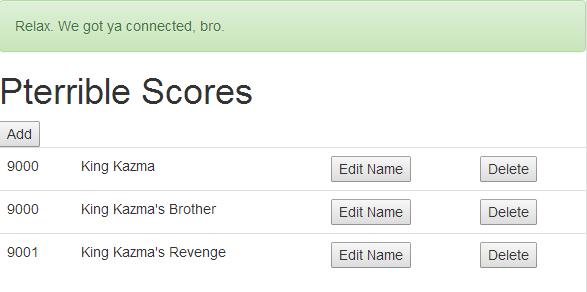
Now that’s progress. Let’s make a moment to reflect on our success. Pffft, naw – time to press all the buttons! Let’s add a new score since it’s what we’re ultimately striving for, as our application will need to commit a new score and the player’s name to our database. In the logic for our addScore function, we prompt the user to provide a score (this will obviously be handled systematically once we create our game) and a playername. If our app doesn’t get this information, it won’t attempt to POST to our database.

Naturally. And a name…
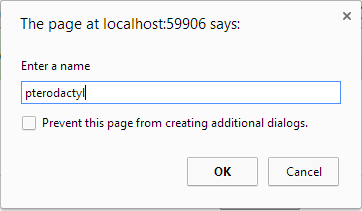
Ok, let’s see some updates. Our page after providing the information we wanted…

Behaviour as desired! This means our database updated too, right? Let’s walk to the Couch. It looks like our site made our design (with our design function inside)

And our new score was added..

POST functionality is officially a-go. The other functions we threw in work like a gem as well (give a little trust here).
Whew, that’s a lot to take in. Let’s let that sink in for a bit. Part 2 of Messin’ with the Couch will begin our epic journey into node.js and AngularJS territory. And research shows, it’s gonna be a crazy, yet rewarding, trip.
 Code Pterodactyl